> ## Documentation Index
> Fetch the complete documentation index at: https://specterops-bp-2735-release-notes.mintlify.site/llms.txt
> Use this file to discover all available pages before exploring further.
# About BloodHound Edges
> Edges are part of the graph construct and are represented as links/relationships that connect one node to another node.
 For example, the image below shows three [User](/resources/nodes/user) nodes (left side) connected to one [Group](/resources/nodes/group) node (right side), via the [MemberOf](/resources/edges/member-of) edge, indicating the three users belong to the group:
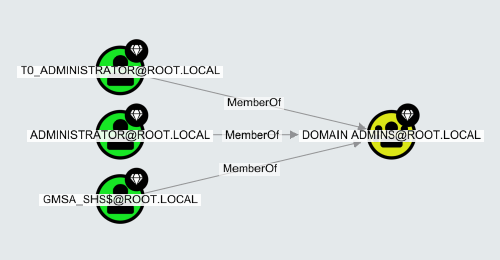 The direction of the edge, indicated by the arrow, always indicates the direction of attack or privilege. From the above example, because all three users have a [MemberOf](/resources/edges/member-of) edge pointing towards the group, all three users have the same privileges as the group.
Clicking on an Edge's name/label in the graph shows its properties in the Entity Panel:
The direction of the edge, indicated by the arrow, always indicates the direction of attack or privilege. From the above example, because all three users have a [MemberOf](/resources/edges/member-of) edge pointing towards the group, all three users have the same privileges as the group.
Clicking on an Edge's name/label in the graph shows its properties in the Entity Panel:
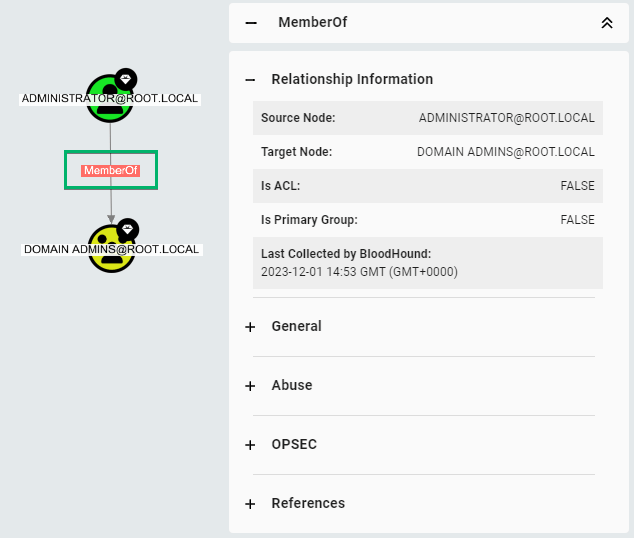 Edges have only a few properties, which always include the following:
* Source Node
* Target Node
* Last Seen by BloodHound
Each article in this section documents an individual edge, and each contains:
* A description of the edge.
* **Abuse Info:** How red teamers can use the privilege of the edge to obtain their goals.
* **Opsec Considerations:** What red teamers should consider avoiding detection and thereby increasing **op**erational **sec**urity.
* **Edge Schema:** Lists valid edge sources and destinations (targets) and specifies whether the edge is traversable.
* **References:** Links to publicly available sources used to create the above information.
Note that edge names indicate what directory they apply to; all Azure and Entra ID edges are prefixed with "AZ", while Active Directory edges have no prefix.
Edges have only a few properties, which always include the following:
* Source Node
* Target Node
* Last Seen by BloodHound
Each article in this section documents an individual edge, and each contains:
* A description of the edge.
* **Abuse Info:** How red teamers can use the privilege of the edge to obtain their goals.
* **Opsec Considerations:** What red teamers should consider avoiding detection and thereby increasing **op**erational **sec**urity.
* **Edge Schema:** Lists valid edge sources and destinations (targets) and specifies whether the edge is traversable.
* **References:** Links to publicly available sources used to create the above information.
Note that edge names indicate what directory they apply to; all Azure and Entra ID edges are prefixed with "AZ", while Active Directory edges have no prefix.